

A vote button with no backend

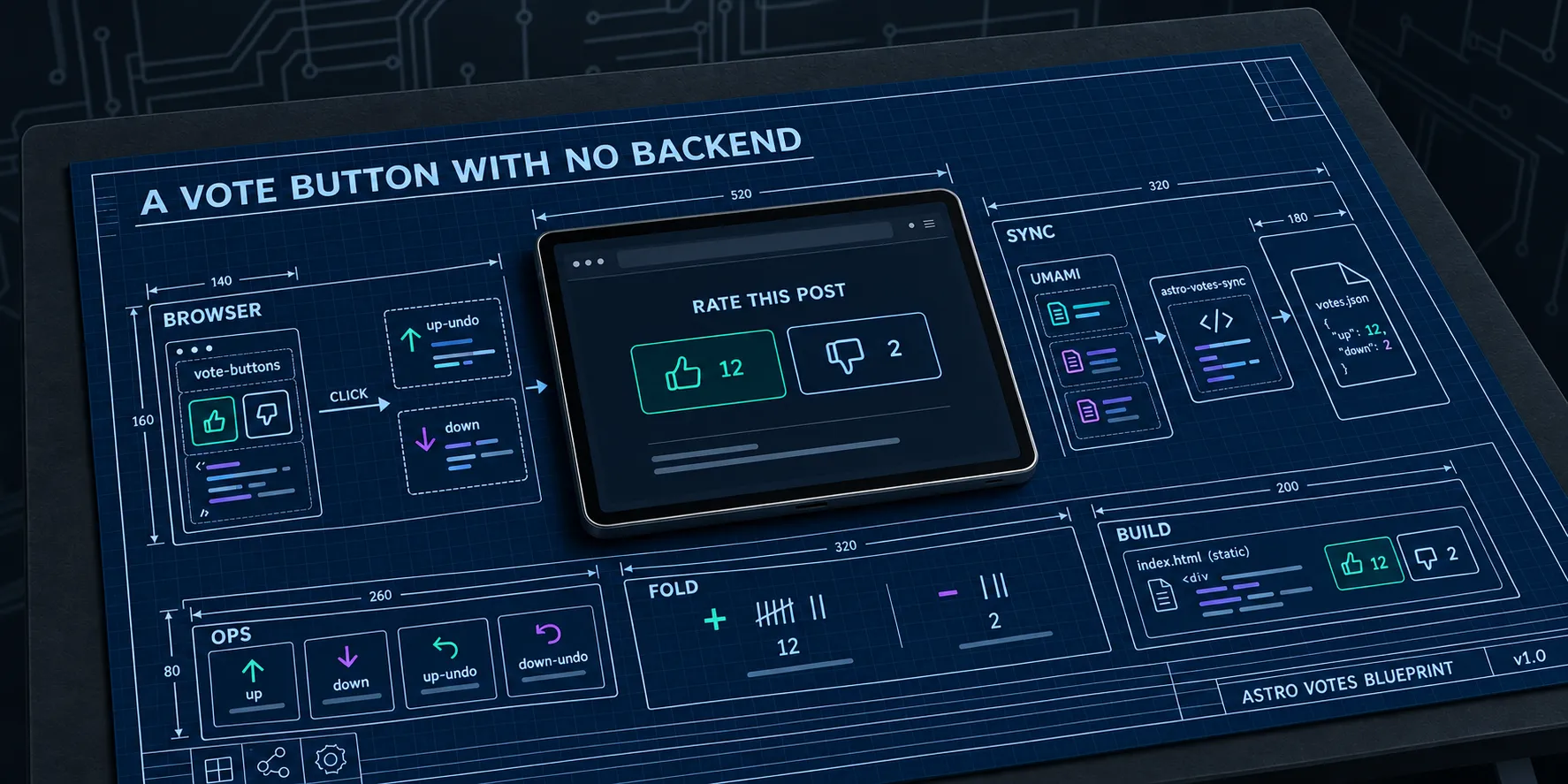
Part 1 covered the daily build that stands in for a
server. This part is the component that rides on it:
@sjohansson/astro-votes. It’s MIT licensed and about 850
lines of TypeScript.
It has three pieces, and each runs at a different time:
- A
<vote-buttons>web component, in the browser, whenever someone clicks. - The
astro-votes-syncCLI, in CI, once a day. - A JSON file, read by
astro build, straight after.
Wiring it into Astro
The integration registers the element on every page and picks where votes go:
// astro.config.ts
import votes from "@sjohansson/astro-votes/integration";

export default defineConfig({
  integrations: [votes({ transport: "umami" })],
});
The post layout renders the buttons at the end of each post:
---
import { voteAttributes, voteButtonsHTML } from "@sjohansson/astro-votes";
import votes from "../data/votes.json";

const voteAttrs = voteAttributes(votes, slug);
---

<vote-buttons
  {...voteAttrs}
  group-label="Rate this post"
  set:html={voteButtonsHTML({ ...voteAttrs, groupLabel: "Rate this post" })}
/>
voteAttributes turns the file into four attributes: item, up, down, and synced-at. A post nobody has voted on
gets zeros. voteButtonsHTML renders the buttons into the static HTML, so nothing shifts when the element upgrades.
With JavaScript off you still see the counts. You just can’t click.
The element uses light DOM, not shadow DOM. Site CSS applies directly, and the built-in styles sit inside :where() so
they lose every specificity fight. Theming is a handful of custom properties. This is the blog mapping them to its own
tokens:
vote-buttons {
  --votes-fg: var(--blog-button-content-color);
  --votes-bg: var(--blog-button-bg-color);
  --votes-border: var(--blog-button-ring-color);
  --votes-accent: var(--blog-link-color);
  --votes-accent-fg: var(--blog-surface-color);
  --votes-focus: var(--blog-link-color);
}
The wire format
Every change goes out as one or more events named vote, each with a single property, also vote, whose value is
<item>:<op>. There are six ops:
| Change | Ops sent |
|---|---|
| none to like | up |
| none to dislike | down |
| like to none | up-undo |
| dislike to none | down-undo |
| like to dislike | up-undo, down |
| dislike to like | down-undo, up |
export function opsForChange(from: VoteState, to: VoteState): VoteOp[] {
  if (from === to) return [];
  const ops: VoteOp[] = [];
  if (from) ops.push(`${from}-undo`);
  if (to) ops.push(to);
  return ops;
}
Totals are up minus up-undo and down minus down-undo, never below zero. Click like 40 times and you send 20 up
and 20 up-undo, which nets to nothing. Click it 41 times and you’ve liked it once. No rate limiting needed.
Putting the item and the op in one property value is what keeps the sync cheap. Umami’s event-data values endpoint returns each distinct value with a count, so a single query covers every post on the site. A post with one like and nothing else comes back as one row:
[{ "value": "four-agents-one-hero-image:up", "total": 1 }]Each post gets at most four rows, one per op.
The sync
astro-votes-sync runs in the scheduled workflow:
- name: 🗳️ Pull vote totals from Umami
  run: pnpm exec astro-votes-sync --out src/data/votes.json
  env:
    UMAMI_API_KEY: ${{ secrets.UMAMI_API_KEY }}
    UMAMI_WEBSITE_ID: 930ef364-ec51-4ca5-b5af-2b09ca6a0a21
It only reads the API key from the environment, so the key never shows up in a command line or a log. The website id is not a secret. It’s in every page the tracker loads on.
Umami returns at most 100 rows per query. Rather than paging, the sync splits the time range in half until every part comes back with fewer than 100 rows:
const collect = async (startAt: number, endAt: number): Promise<ValueRow[]> => {
  const rows = await query(startAt, endAt);
  if (rows.length < UMAMI_ROW_LIMIT) return rows;
  if (endAt - startAt <= MIN_WINDOW_MS) {
    throw new Error(`More than ${UMAMI_ROW_LIMIT} vote values inside one minute, cannot split further.`);
  }
  const mid = Math.floor((startAt + endAt) / 2);
  // Umami's range is inclusive at both ends, so the halves must not share a millisecond.
  return [...(await collect(startAt, mid)), ...(await collect(mid + 1, endAt))];
};
The halves get added together afterwards, so the counts stay exact however many posts there are. It waits 350 ms between requests to stay under Umami Cloud’s limit of 50 calls per 15 seconds per key. With one vote on the site, it makes one request. I reckon the splitting will stay theoretical for a while.
If the counts haven’t changed, it leaves the file alone. Otherwise the job would commit a fresh timestamp every night and the history would be nothing but bot noise.
The first release got authentication wrong. It sent the API key as a bearer token, which is what self-hosted Umami
wants. Umami Cloud wants an x-umami-api-key header and answered with a 401. Version 0.1.1 picks the header from the
API host. The unit tests passed the whole time, because they mocked fetch and checked exactly what I told them to
check. I’ve written about that sort of thing before.
Using it with something other than Umami
The transport is just a function that gets called once per op. Umami is built in. For anything else, pass your own:
import { configureVotes } from "@sjohansson/astro-votes";

configureVotes({
  transport: ({ eventName, value }) => window.plausible?.(eventName, { props: { vote: value } }),
});
Every change also fires a bubbling vote-change event with { item, from, to, ops }, so you can set the transport to
"none" and listen for that instead.
The sync side only talks to Umami today. For another provider you write the fetch and hand the rows to the same folding code the CLI uses. If your tool can return each distinct property value with a count, it works:
import { buildVoteData, fold, writeVoteData } from "@sjohansson/astro-votes/sync";

// [{ value: "my-post:up", total: 12 }, { value: "my-post:up-undo", total: 2 }, ...]
const rows = await fetchFromYourProvider();
await writeVoteData("src/data/votes.json", buildVoteData(fold(rows), new Date()));
Garbage in
The site’s own events go through the relay from part 1, which drops anything that doesn’t match the vote pattern. That keeps honest traffic clean. It doesn’t stop anyone determined. The website id is public and nothing prevents a script posting events straight to Umami.
The sync is the second check. fold() runs every value through parseVote and skips anything that doesn’t parse, so a
junk event can’t break the file or the build. A well-formed fake vote will count, though. For a like button on a blog I
can live with that. If someone wants to script fake likes onto my keyboard posts, fair enough.
Part 3 covers what happens in your browser between the click and the next morning’s build.