

Adding server features to a no-server static website
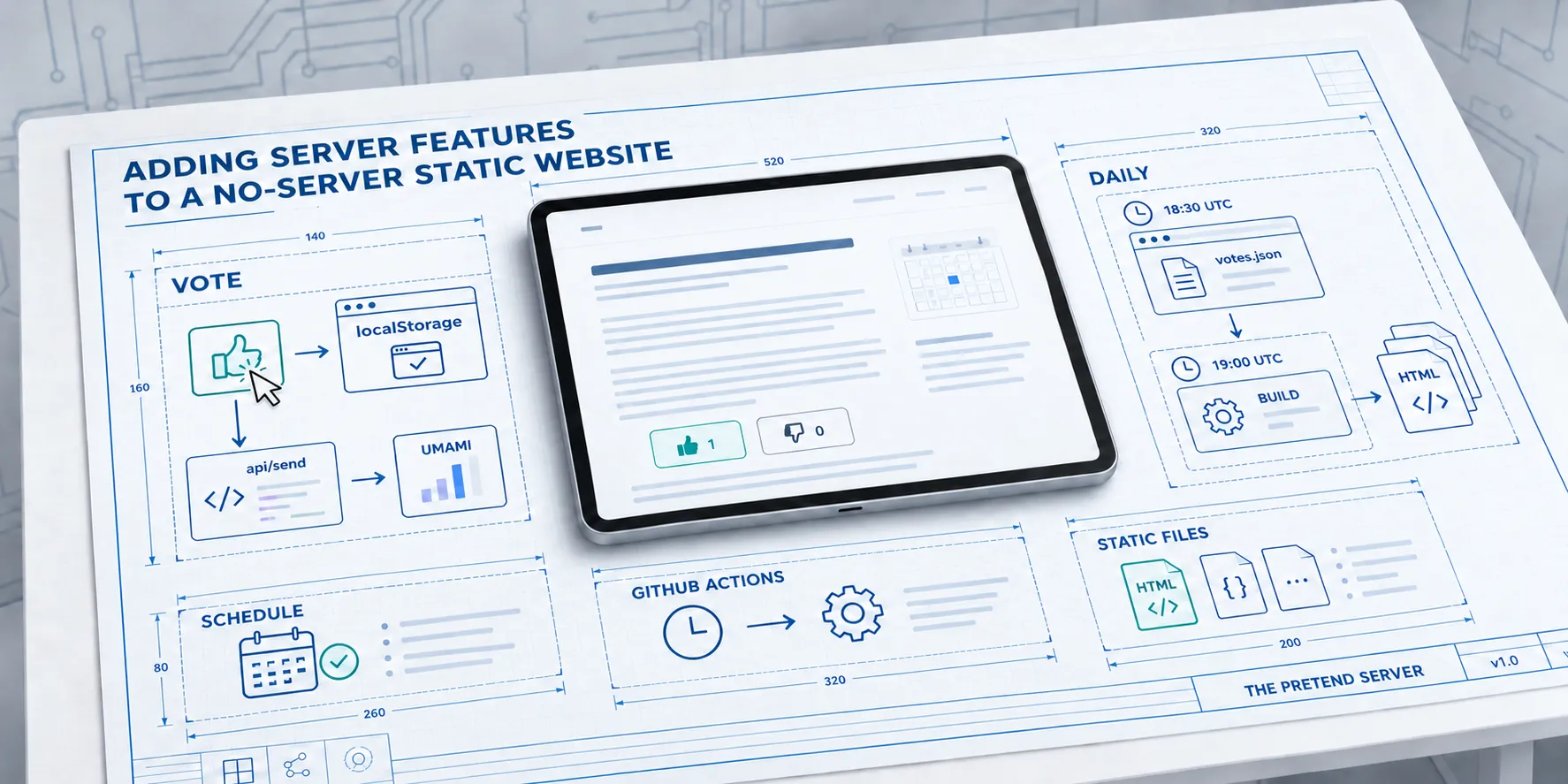
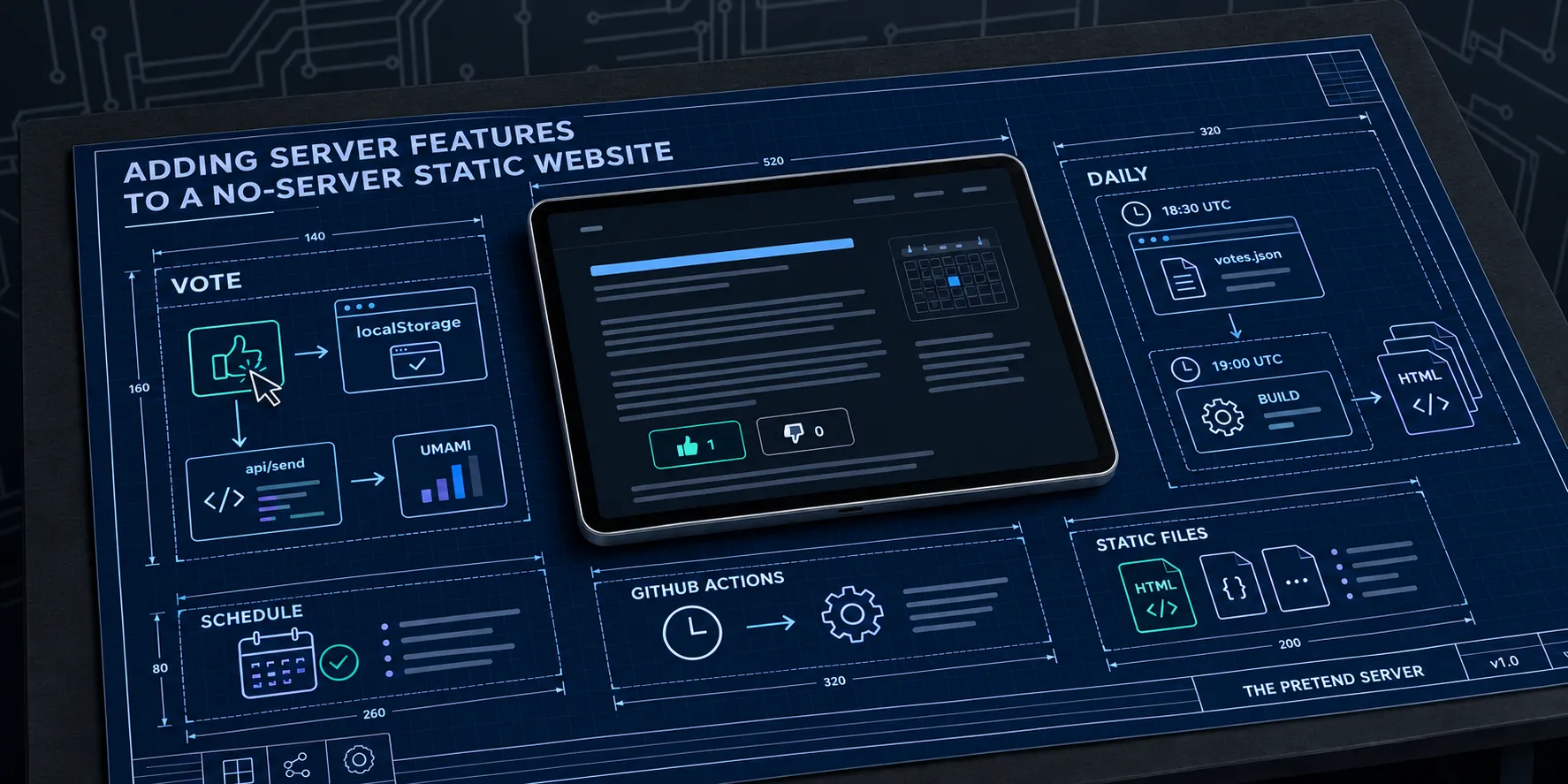
This blog is a folder of HTML files. Astro builds it, Azure Static Web Apps serves it on the free plan, and there is no database and no server anyone looks after. It still does two things you’d normally want server processing for. Posts go live on a set day/schedule without anyone touching anything, and every post ends with like and dislike buttons that count visitor opinions.
The trick is that “the server” only runs once a day, as a GitHub Actions job. In between, your browser pretends to be the server it will see tomorrow.
What a server would normally do
Strip scheduled posts and vote buttons back to the jobs underneath and there are five:
| Job | Usual place | Here |
|---|---|---|
| Store each vote | Database | Umami, as an analytics event |
| Add the votes up | API endpoint | sync-votes.yml, daily at 18:30 UTC |
| Decide which posts are live | Request handler | isPublished, checked at build time |
| Render the page | Server, per request | astro build, daily at 19:00 UTC |
| Remember what you clicked | Session or user table | Your browser’s localStorage |
None of those need to happen per request. They need to happen once a day, as long as nobody can tell.
The daily tick
Two scheduled workflows do what a server would do all day.
# .github/workflows/sync-votes.yml
on:
  schedule:
    - cron: "30 18 * * *"
  workflow_dispatch:
# .github/workflows/deploy-content.yml
on:
push:
branches:
- main
schedule:
- cron: "0 19 * * *"
workflow_dispatch:At 18:30 UTC the sync job asks Umami for every vote event, adds them up, and commits src/data/votes.json to main if
anything changed. At 19:00 UTC the deploy job builds the whole site and uploads it to Azure. In Sydney that’s 5:30am and
6am during daylight saving, an hour earlier in winter. By the time anyone here has had brekkie, the site has today’s
posts and yesterday’s votes.
The 30 minute gap is on purpose. A push made with the workflow’s GITHUB_TOKEN does not start other workflows, so the
sync commit can’t trigger a deploy by itself. Rather than hand the job a personal token to get around that, the deploy
just runs after it.
Scheduled posts are a date comparison
There is no publishing queue. Every post sits in main with a publishDate in its frontmatter, and the build filters
on it:
export function isPublished(data: { isDraft?: boolean; publishDate?: Date }, now: Date = new Date()): boolean {
  if (data.isDraft === true) return false;
  if (!data.publishDate) return true;
  return data.publishDate.toISOString().slice(0, 10) <= sydneyDay(now);
}
sydneyDay formats the current instant as a calendar day in Australia/Sydney. The build runs at 6am Sydney time, so a
post dated today makes that morning’s build. A finished post dated next week can be merged today and turns up on its
day. This series works that way: all three parts were written together, merged together, and come out a week apart.
If I want something out now, I run the deploy workflow by hand from the Actions tab. That’s the whole admin panel.
Votes are analytics events
The blog already runs Umami for page views. Umami takes custom events with properties, keeps them, and has an API to query them. That’s an append-only database with a read API, which is all a vote counter needs.
A click on the like button sends one event:
umami.track("vote", { vote: "four-agents-one-hero-image:up" });The sync job reads those back, adds them up, and writes a file the build imports:
{
  "updated": "2026-10-10T06:02:05.303Z",
  "items": {
    "four-agents-one-hero-image": {
      "up": 1,
      "down": 0
    }
  }
}
That is the real file as of today. One vote, across the whole blog. Somewhat humbling, especially as it is my own vote, but it proves the pipe works end to end.
The post layout imports the file at build time and hands the counts to the buttons as attributes. The HTML that goes out has the numbers in it. No fetch, no spinner, nothing to go wrong in the browser.
The one piece of real server code
There is one Azure Function, in api/send. The free plan includes managed functions, and this one is 87 lines with no
dependencies. It holds no state. It forwards the Umami tracker’s events to Umami Cloud, so the tracker talks to my own
domain and ad blockers are less likely to drop it. It also checks vote events on the way through:
const VOTE_EVENT = "vote";
const VOTE_VALUE = /^[A-Za-z0-9._/-]{1,200}:(?:up|down)(?:-undo)?$/;

if (payload.name === VOTE_EVENT) {
  const vote = payload.data?.vote;
  if (typeof vote !== "string" || !VOTE_VALUE.test(vote)) return null;
  payload.data = { vote };
}
A malformed vote gets a 400 and never reaches Umami. A good one goes through with nothing else attached. It’s a filter, not a server: it remembers nothing between requests.
It did bite me once. The module exports three functions, and the Functions runtime only guesses the entry point when
there is a single export, or one called run or index. Every call failed with a 500 until function.json named
default as the entryPoint.
Between builds, the browser covers
The obvious hole: you click like at 10am, and the next build is 6am tomorrow. If the page only showed the built count, your click would vanish the moment you reloaded.
So the button keeps your vote in localStorage and adds it on top of the built count. When tomorrow’s page arrives with
a sync time later than your click, it knows the count already includes you and stops adding. To you it behaves like a
live counter. Part 3 goes through how that works and where it breaks.
What you give up
- Other people’s votes show up the next morning, not when they click. For the blog that’s fine. For a poll during a talk it’s useless.
- It’s an honour system. Clear your storage and you can vote again. The Umami website id is in every page, so anyone can post events straight to Umami and skip my filter.
- A failed job means stale counts until the next one works. Nothing breaks, the numbers just stop moving.
- Publishing today means a manual workflow run. There’s no “publish” button that takes effect in seconds.
Anything that needs a write other people see within seconds, like comments or logins, needs a real backend. Likes, scheduled posts, and counts that can be a day old don’t.
Part 2 covers the vote component itself, and how to use it with something other than Umami.