

How the NESA Assessor works


The NESA Assessor is an AI agent that marks an exported folio PDF against the published HSC Textiles and Design Major Textiles Project criteria. It is built to be run more than once. You export, it marks, you fix, you export again.
The example folio in the hsc-major-work-example repository is fictional, and it has faults on purpose so there is something for the assessor to find. Its plain, industrial look is there to show code-first design, not to be reskinned with your own garment. If you are a student, bring your own flair to your folio.
The assessor isn’t tied to textiles. Give it another subject’s marking criteria in the same form and it will mark against those instead. Check the NESA subject pages for the current guidelines before you do.
What it marks
A textiles folio is worth 25 marks across four sections, which must appear in this order:
| Section | Marks | A3 pages |
|---|---|---|
| Design Inspiration | 5 | 2 |
| Visual Design Development | 5 | 3 |
| Manufacturing Specification | 5 | 3 |
| Investigation, Experimentation and Evaluation | 10 | 4 |
The assessor estimates those 25 marks only. The textile item’s 25 marks are never estimated, and neither are authenticity, certification, the cover sheet, or the box. Those are listed as “submission checks outside this PDF” and left for your teacher.
Step 1: read the rules
Before it opens the PDF, the agent reads two files in full: nesa-marking-facts.md and folio-marking-notes.md. The first holds NESA’s mark ranges word for word. The second holds how a mark is placed and what counts as evidence. The agent quotes these files rather than working from memory, so every judgement can be traced back to a sentence NESA published.
Step 2: record which file was marked
The review starts with the file name, export date, size in bytes, and SHA-256 hash of the PDF. A review describes one export. When the folio changes, the review is out of date, and the hash makes that obvious.
Step 3: measure before reading
The agent runs a script over the PDF before it reads a word of prose. The script checks:
- page count and page size, and pages per section against 2, 3, 3, and 4
- the smallest text on every page, including labels inside drawings, against NESA’s 12 point floor
- the placed size of every image and swatch
- that body text clears the footer on every page
- the costing total
- curly quotes, long dashes, and banned words in the extracted text
- every drawing with a stated scale, measured against the dimension written on it
It also renders every page to an image and looks at each one. A page that is not looked at is not marked.
Measurement comes first because numbers a marker can check with a ruler or a calculator carry the most weight. A wrong scale or a total that does not add up makes a marker doubt every number around it.
Step 4: place each mark
NESA does not mark the folio in bands. Each section has mark ranges, and each range has a descriptor written as dot points. The agent reads the top range dot point by dot point and looks for the evidence on the page. A claim without evidence on the page scores as if it had not been made.
Investigation, Experimentation and Evaluation is marked first and hardest, because it is worth as much as any two other sections.
Some rules keep the marking fair:
- Faults are not added up. Three small problems under one dot point count as one fault.
- A contradiction outranks style. A plate, number, or mount that disagrees with the words beside it costs more than any issue of format.
- The plate beats the caption. If a caption says one thing and the picture shows another, the section is marked on the picture.
- Format is not a fault. Digital drawings, monochrome sketches, and plain layouts are not penalised.
Step 5: write the review
The review goes to build/reviews/ and follows the same template every time:
- The file record and the premise the folio was marked under.
- A compliance audit: page limits, text size, section order, required elements.
- A section table with the quoted dot point, the mark, and what holds it back.
- Findings, one row each, ordered by marks at stake. Each has a priority from P0 to P3, the page, where on the page, what is wrong, the fix, and where in the source the fix belongs.
- Submission checks outside the PDF, unscored.
- On a rerun, a status table for every finding from the last review.
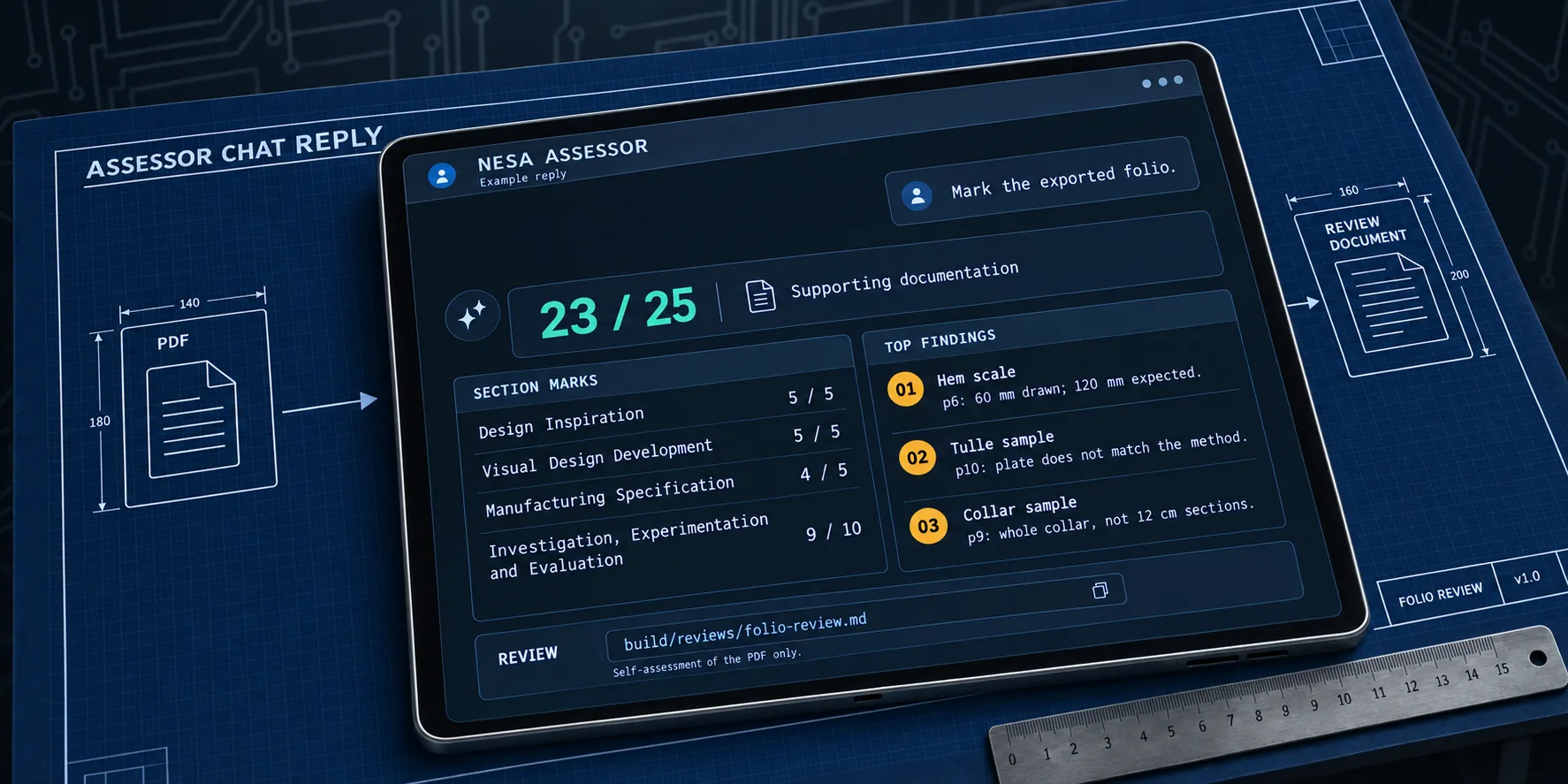
In chat, the agent replies with the total, the four section marks, the three findings with the most marks at stake, and the path to the review.

Four agents, one folio
I ran the assessor on the example folio in four hosts, with the same rules and the same PDF:
| Host and model | Total | Review |
|---|---|---|
| Claude Code, Claude Opus 5.5 | 23 of 25 | review |
| Codex, GPT-6 Astra | 23 of 25 | review |
| GitHub Copilot, GPT-6 Luna | 23 of 25 | review |
| Gemini | 25 of 25 | review |
Three of the four put every section in its top range and took off the same two marks, both for evidence a marker could check:
- The front and back flat drawings were true to their 1:10 scale everywhere except the skirt hem. The 240 cm hem was drawn at 60 mm, half its stated width.
- Sample plates on pages 9 to 11 showed something other than what their methods made. One method made three 12 cm collar sections, but its plate showed a whole collar on a shirt.
Neither finding is about the writing. Both are the kind of thing that is easy to miss after weeks with your own pages and quick to spot with a ruler.
The fourth review gave full marks and missed both. Same rules, same PDF. The model behind the agent still matters, and the field moves fast enough that these results will be stale within a month. Use the host you’re comfortable with, and if a review looks too kind, run it again in another one.
The marks/ folder holds these reviews for reference. New reviews go to build/reviews/, so look there after you mark
your own folio.
Iterating towards a better folio
The assessor is most useful as a loop:
- Export the folio to PDF.
- Mark it: ask your agent host to “mark the folio”, with a PDF path or with none to mark the current export in
output/. - Read the findings, highest marks at stake first.
- Fix the work yourself. Redraw the hem, rephotograph the sample, correct the total. The agent describes the fix and never applies it.
- Export and mark again. The new review carries a status line for every earlier finding: fixed, still open, or no longer relevant. Finding numbers continue from the last run, so nothing is quietly dropped.
Some habits make the loop work better:
- Fix contradictions before polish. A wrong number costs more than an awkward sentence.
- Commit each round in Git. The history shows exactly what changed between one review and the next.
- Do not argue settled points. If you have made a decision and recorded why, the agent is told not to reopen it unless the premise changes.
- Do not chase the number. The target is the top descriptor in every section. The review says how far the evidence is from it and which fault is in the way. It is a self-assessment, not a prediction of your HSC result.
What it will not do
The assessor reads, measures, quotes, and points. It does not write or rewrite folio prose, draw anything, invent
results, generate images to stand in for your samples, or decide your design. In Claude Code a hook enforces this by
refusing any write outside build/reviews/. The fixes are yours to make, and that is what keeps the folio your own
work. Responsible AI and the HSC goes into why.
Running it
The agent is defined once in .agents/agents/nesa-assessor.md, with thin wrappers for Claude Code, GitHub Copilot, and
Codex. The agents page explains how each host runs
it. It needs Python with PyMuPDF for the measurements, and Node.js to lint and spell-check the review. It does not need
an MCP server.